
If you want to learn how to grow on Pinterest and drive meaningful traffic to your website or business, you’ve come to the right place. Many people misunderstand Pinterest, thinking it’s just another social network for sharing attractive photos. However, it’s far more powerful than that.
Pinterest operates as a visual discovery engine. Users visit with purpose they search for solutions, seek inspiration, and plan purchases or projects. A significant advantage is that your content doesn’t vanish after 24 hours like on other platforms. A pin you publish today might still generate traffic two years later.
This comprehensive guide will walk you through everything required to expand your Pinterest presence, increase content visibility, and convert views into genuine website visits. Whether you’re starting from scratch or refining an existing approach, this guide provides actionable insights.
Why Pinterest Operates Differently from Other Social Platforms
Before discussing tactics, let’s examine what makes Pinterest unique. Understanding this will transform your platform strategy.
Pinterest is primarily a search engine, secondarily a social network. When users open Instagram or Facebook, they typically browse feeds to see updates from friends. On Pinterest, however, people usually search for something specific “small bathroom ideas,” “meal prep for beginners,” or “budget wedding planning.”
This search-first behavior gives your content remarkable longevity. Unlike a tweet buried within minutes or an Instagram post that loses visibility after a day, your pins can appear in search results and suggested feeds for months or even years.
Another crucial distinction: Pinterest users are planners and doers. They actively seek content to save and use later, making them more inclined to click through to your website and engage with your material.
Think of Pinterest as the offspring of Google and Instagram it merges visual appeal with search functionality, creating unique opportunities for content creators.
Establishing Your Pinterest Foundation for Success
Transitioning to a Business Account
First, if you haven’t already, convert to a Pinterest Business account immediately. It’s completely free and offers significant advantages.
A business account provides access to Pinterest Analytics, showing precise pin performance. You also gain Rich Pins functionality (more details later), advertising capabilities if desired, and generally better content distribution.
The conversion process is straightforward. Navigate to your settings, locate the account type option, and switch to business. This takes about two minutes but makes a substantial difference.
Creating a Profile That Appeals to Pinterest’s Algorithm
Your profile serves as the first impression for both Pinterest’s algorithm and potential followers. Optimization is key you want Pinterest to instantly grasp your account’s focus.
Your display name is more important than you realize. Rather than using only your name or business name, incorporate descriptive keywords that clarify your niche. For example, instead of “Jennifer Smith,” use “Jennifer Smith | Budget Travel Tips & Hacks.” This helps Pinterest categorize your content accurately and lets users immediately understand your specialty.
Your bio must work effectively. With limited space, make every word count. Write two or three sentences clearly explaining who you assist and what value you provide. Naturally include relevant keywords avoid awkward stuffing.
Example of an optimized bio: “I help overwhelmed moms create simple meal plans that save time and money. Sharing easy recipes, grocery shopping tips, and kitchen organization ideas that actually work.”
This bio is conversational, includes keywords (meal plans, easy recipes, grocery shopping tips, kitchen organization), and clearly defines the audience and benefits.
Mastering Pinterest SEO: The True Growth Secret
This is where many falter yet it’s the most critical component of Pinterest success. Since Pinterest is fundamentally a search platform, SEO (search engine optimization) isn’t optional; it’s essential.
Identifying Where Keywords Truly Matter
Pinterest examines keywords across multiple areas of your account:
– Your profile name and bio (already covered)
– Every board title you create
– Each board description
– Individual pin titles
– Individual pin descriptions
– Text on your pin images
This may seem overwhelming initially, but once you comprehend the system, it becomes intuitive.
Effectively Discovering the Right Keywords
Don’t guess keywords allow Pinterest to reveal what people are actually searching for.
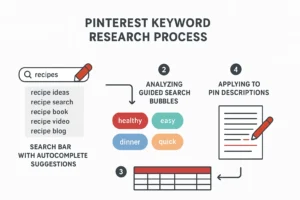
The search bar method: Begin typing a relevant topic into Pinterest’s search bar. Before finishing, Pinterest displays autocomplete suggestions based on real, popular searches. Record these they’re invaluable.
For instance, in the fitness niche, typing “home workout” might yield suggestions like “home workout for beginners,” “home workout no equipment,” and “home workout plan.” Each represents a keyword phrase to incorporate into your content.
The guided search technique: After executing a search, examine the colored bubble tags beneath the search bar. These represent related, high-intent search terms. Click through them to discover additional keyword variations.
Pro tip: Maintain a simple spreadsheet to collect niche keywords, organized by topic. This becomes your keyword library for creating pins and writing descriptions.
Developing Boards That Actually Get Discovered
Consider boards as the organizational system for your Pinterest account. Each should represent a distinct topic or category within your overall niche.
Board titles must be crystal clear and keyword-focused. Avoid overly creative names that no one would search for. For a blog about home organization, “Tidy Spaces” is less effective than “Home Organization Ideas” or “Small Space Organization Tips.”
Board descriptions are highly underutilized. Many leave them blank or write a weak sentence a major mistake. Pinterest reads these descriptions to understand board content, and users consult them to decide whether to follow.
Write two or three solid sentences for each board description. Naturally include your main keyword, explain the content type, and identify the target audience.
Example: “Discover practical home organization ideas perfect for busy families and small spaces. Find closet organization tips, kitchen storage solutions, and decluttering strategies that make your home more functional and peaceful.”
How many boards should you create? Begin with 10-15 well-defined boards covering main niche topics. You can expand later as content grows. Quality and organization outweigh quantity.
Designing Pins That Compel Clicks
As a visual platform, Pinterest success heavily depends on pin design. Even with outstanding content, poorly designed pins will be scrolled past.
Technical Fundamentals
Pinterest favors vertical images. The optimal dimensions are 1000 pixels wide by 1500 pixels tall (a 2:3 ratio). This format occupies more feed space and naturally attracts attention.
Free tools like Canva offer numerous correctly sized Pinterest templates for pin creation.
Elements of a Clickable Pin
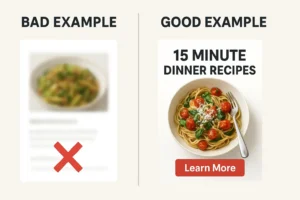
Text overlay is essential. Your pin requires a bold, readable headline communicating content value. Don’t make users guess what they’ll gain by clicking.
Weak headline: “Check This Out”
Strong headline: “10 Beginner-Friendly Budget Strategies That Actually Work”
Use easily readable fonts. Ornate script fonts may appear attractive, but if users can’t read text while scrolling, you’ll lose them. Bold, clear fonts consistently perform better.
Leverage color contrast. Text must stand out against the background. High-contrast combinations (like dark text on light backgrounds or vice versa) significantly outperform low-contrast designs.
Include faces when appropriate. Pins featuring human faces typically achieve higher engagement. If your content involves people or showcases yourself, incorporate that into the design.
The Multiple Pin Strategy
This approach can substantially boost reach: create several distinct pin designs for the same content piece.
Suppose you write a blog post about meal planning. Don’t create just one pin. Develop 3-5 completely different designs with varied headlines, color schemes, and imagery. Different users will respond to different designs. This also allows testing audience preferences.
Pinterest’s algorithm recognizes fresh, unique content (not merely repinned material) and rewards it with better distribution.
Writing Pin Descriptions That Convert Scrollers to Clickers
Your pin description is prime real estate this is where you convince users that clicking through to your content is worthwhile.
Title Best Practices
Keep pin titles between 40-60 characters. Include your primary keyword naturally while maintaining compelling readability.
Good example: “Easy Meal Prep Ideas for Busy Weeknights”
Poor example: “Meal Prep Ideas Easy Quick Simple Dinner Lunch”
The first option is specific, readable, and naturally incorporates keywords. The second is merely keyword stuffing and deters users.
An Effective Description Formula
Apply this straightforward three-part formula for writing impactful pin descriptions:
First sentence: Lead with value, naturally including your main keyword. What will users gain from this content?
Second sentence: Expand on the benefit or preview content. Build interest.
Third sentence: Incorporate a gentle call-to-action or create urgency. Encourage saving or clicking.
Practical application:
“Discover 15 meal prep ideas that make weeknight dinners effortless, even when you’re short on time. These simple recipes use basic ingredients and can be prepared in under an hour on Sundays. Save this for your next meal planning session!”
Observe the structure: Value + keyword → benefit expansion → call-to-action.
Length considerations. Avoid single-sentence descriptions. Aim for 100-200 words. More text provides Pinterest with greater context for understanding and categorizing your content, improving visibility in relevant searches.
Consistency: The Unpopular Yet Essential Ingredient
Yes, everyone emphasizes consistency but here’s why it particularly matters on Pinterest.
Pinterest’s algorithm learns from your posting patterns. Regular fresh content signals reliability, prompting the algorithm to show your pins to more users. Irregular posting confuses the algorithm and restricts reach.
Determining Posting Frequency
The sweet spot for most users is 3-10 pins daily. This may sound excessive, but remember: you’re not creating 10 original content pieces daily. You’re distributing content across multiple pin variations (using the multiple-design strategy) and potentially pinning to several relevant boards.
Timing also matters. Instead of publishing all pins simultaneously, spread them throughout the day. This provides multiple visibility opportunities and signals consistent account activity to Pinterest.
Making Consistency Sustainable
The key to maintaining consistency without burnout is scheduling. Pinterest includes a built-in scheduling tool. Tools like Tailwind offer advanced features for those who prefer them.
Dedicate one or two days monthly to batch-create pins and write descriptions. Then schedule them. This removes daily pressure while sustaining the consistent presence Pinterest rewards.
The Advantage of Fresh Content
Pinterest strongly prioritizes fresh content images not previously uploaded to the platform.
This doesn’t require entirely new blog posts or products daily. It requires new pin designs. Remember those 3-5 variations? Those constitute fresh content. Same destination URL, different visual presentation.
Why this matters: When uploading a completely new image, Pinterest’s algorithm treats it as original content and boosts its distribution. Repinning existing content (yours or others’) doesn’t receive the same algorithmic push.
Focus energy on creating new pin designs rather than merely repinning existing content. This single adjustment can dramatically enhance results.
Analyzing Your Analytics Like an Expert
Pinterest Analytics functions as a roadmap indicating where to concentrate efforts. Ignoring it resembles driving cross-country without navigation—you might eventually arrive, but the journey will take much longer.
Metrics That Truly Matter
Impressions indicate how frequently your pins appear. This is your visibility metric. Low impressions suggest SEO improvements or increased posting consistency are needed.
Saves (formerly repins) signify quality. When users save your pin to their board, they essentially endorse your content’s value. High saves relative to impressions indicate effective strategies.
Outbound clicks represent the ultimate goal for most users. This shows how many users clicked through to your website where Pinterest traffic converts to website traffic.
Close-up views indicate clicks on your pin for enlargement, showing interest even without site clicks.
Applying This Information
Review analytics weekly (minimum monthly). Identify patterns:
– Which pins receive the most impressions? Create more content around those topics.
– Which boards generate top-performing pins? That topic resonates emphasize it further.
– Which pin designs achieve the most clicks? Incorporate similar design elements in future pins.
Pinterest essentially reveals what your audience desires. Listen and provide more of it.
Creating Content Pinterest Users Genuinely Want
Pinterest users seek specific content types. Aligning your content with these natural preferences accelerates growth.
Tutorial content performs exceptionally well. Step-by-step guides, how-to posts, and instructional material are Pinterest gold. Users visit to learn procedures.
List-based content is highly saveable. Posts titled “15 Ways to…” or “10 Best…” offer quick, scannable value users want to reference later.
Evergreen content possesses the longest lifespan. Content remaining relevant regardless of discovery timing continues driving traffic for years. Consider “Beginner’s Guide to Vegetable Gardening” rather than “2025’s Top Gardening Trends.”
Solution-focused content succeeds. Remember, users search for problem solutions. Frame content around addressing those problems.
Content Requiring Careful Consideration
Time-sensitive news content underperforms on Pinterest. The platform’s strength is longevity, and news quickly becomes outdated.
Extremely trendy content tied to momentary fads won’t deliver lasting results. While it might generate temporary spikes, it won’t contribute to long-term growth.
Political or controversial content requires thoughtful handling, as it can limit reach and reduce brand partnership appeal.
Understanding Idea Pins and Appropriate Usage
Idea Pins (formerly Story Pins) are Pinterest’s response to Instagram Stories and TikTok multi-page, full-screen content without external links.
Benefits: Idea Pins can reach new audiences and establish niche authority. Pinterest actively promotes this format, often resulting in good distribution.
Trade-off: Idea Pins cannot include external links, so they don’t directly drive website traffic. They primarily support brand building and visibility.
When to create Idea Pins: Use them for quick tips, behind-the-scenes content, or educational snippets showcasing expertise. Consider them top-of-funnel content raising awareness and encouraging follows.
Keep them simple: 5-10 pages suffice. Each page should feature clear, readable text delivering one idea or tip. Avoid overcomplication.
Balance is crucial don’t let Idea Pins entirely replace standard traffic-driving pins, but incorporate them to diversify content and boost visibility.
Common Pinterest Mistakes That Hinder Growth
Let’s examine what to avoid. These errors can significantly impede growth or even trigger account flags.
Keyword stuffing creates unreadable descriptions and actually harms SEO. Pinterest recognizes when keywords are jammed together without providing real value.
Inconsistent posting confuses the algorithm. Publishing 20 pins one day followed by two weeks of inactivity leaves Pinterest uncertain how to handle your account.
Poor image quality immediately repels users. Blurry, pixelated, or unprofessionally designed pins get scrolled past. You needn’t be a professional designer, but images must be clear and well-composed.
Copy-pasting identical descriptions across multiple pins appears spammy. Each pin requires a unique description, even when linking to identical content.
Ignoring your niche dilutes authority. If your account focuses on healthy recipes, randomly pinning car repair tips confuses both Pinterest and your audience about your actual focus.
Linking to low-quality sites or sites violating Pinterest’s policies can trigger account suspension. Ensure your website is legitimate, mobile-friendly, and provides genuine value.
Establishing Realistic Growth Expectations
Be completely honest: Pinterest isn’t a get-rich-quick or get-traffic-quick platform. It’s a long-term strategy rewarding patience and consistency.
Months 1-2: This is the learning phase. You’ll determine what works, build your board foundation, and teach Pinterest about your account. Slow growth is completely normal.
Months 3-4: You’ll notice gradual momentum. Some pins will perform better, analytics will reveal patterns, and you’ll refine approaches based on successful elements.
Month 5 onward: The compounding effect emerges. Older pins continue generating traffic while new pins contribute additional traffic, creating exponential growth.
Many abandon efforts just before seeing results due to unrealistic expectations. Don’t be that person. Commit to at least six months of consistent effort before evaluating Pinterest’s effectiveness.
Advanced Tips for Accelerating Growth
Once fundamentals are established, these strategies can elevate your Pinterest performance.
Join and create niche group boards. Group boards allow multiple contributors, exposing your pins to other audiences. Seek active group boards with solid engagement and request participation.
Engage with your audience. Respond to pin comments, follow niche accounts, and interact with their content. Pinterest remains a social platform where engagement builds relationships and visibility.
Test everything. Experiment with different pin designs, headlines, and posting times. Pinterest provides data use it for continuous optimization.
Create seasonal content in advance. Pinterest users plan ahead. Post Christmas content in September, summer content in March. This allows pins to gain traction before seasons arrive.
Utilize Rich Pins by verifying your website. Rich Pins automatically extract website information for display on pins, enhancing informativeness and trustworthiness. Options include recipe, article, and product Rich Pins implement applicable types.
Optimize your website for Pinterest. Install the Pinterest Save button for easy content pinning. Ensure images are pinnable and appropriately sized.
Consolidating Everything: Your Pinterest Action Plan
Let’s distill all information into a practical action plan for immediate implementation.
Week 1: Convert to a business account, optimize your profile with keywords, and create or refine 10-15 boards featuring keyword-rich titles and descriptions.
Week 2: Research niche-specific keywords using search bar and guided search methods. Build your keyword library.
Week 3: Design your initial pin batch (target 15-30 pins) using vertical format and discussed best practices. Create multiple versions for top content.
Week 4: Initiate consistent posting (3-10 pins daily) and establish scheduling for long-term sustainability.
Ongoing: Monitor analytics monthly, create more content around successful topics, adjust underperforming elements, and maintain consistency.
Remember, Pinterest rewards persistence. Every created pin represents a potential long-term traffic source. Today’s content might still deliver visitors in 2027.
Final Thoughts on Building Your Pinterest Presence
Pinterest genuinely ranks among the most powerful platforms for driving traffic when used correctly. Unlike paid advertising that ceases upon payment discontinuation, Pinterest delivers compounding organic results.
The crucial mindset shift involves viewing Pinterest as a search engine rather than social media. When you approach Pinterest with SEO principles, thoughtful design, compelling descriptions, and consistent presence, the platform rewards you with visibility and traffic.
Avoid discouragement from delayed results. Accounts with substantial reach and consistent traffic achieved success through months of strategic, persistent effort.
Begin where you are, apply covered tools and strategies, and commit to the process. Your future self and website traffic statistics will express gratitude.
Now stop reading and start pinning. Your Pinterest growth journey begins with that first optimized pin. You possess the capability!
